This guide walks you through building a Hostel Room Allocation System in PHP and MySQL from the ground up, a hostel management project for assigning students to rooms, complete with source code. Instead of only downloading it, you will understand how each part works: the database schema, how students and rooms are managed, the room allocation logic that prevents over-filling a room, and how availability is tracked. That understanding is what turns a downloaded project into something you can explain in a viva, extend for an assignment, or showcase in your portfolio.
Jump to download & setup
- What a hostel room allocation system does
- The database schema (students, rooms, allocations)
- How student and room management work
- The room allocation logic (the heart of the project)
- How room availability is tracked
- The admin dashboard and login
- Setup: running it on your machine
- How to extend it for your own project
1. What a hostel room allocation system does
A hostel room allocation system is software a hostel or college uses to assign students to rooms and keep track of who is where. It manages the list of students, the list of rooms with their capacities, and the allocations that link a student to a room, while making sure no room is filled beyond its capacity. Building one in PHP and MySQL is a popular project because it touches every fundamental skill, database design, CRUD operations, relationships between tables, authentication, and a real capacity rule, in a context every student recognizes.
The version in this guide includes student management, room management with capacities, the allocation of students to rooms, an availability check that prevents over-filling, vacating a room, and an admin login. That is enough to be a complete, demonstrable project while staying clear enough to fully understand.
2. The database schema
The schema is the backbone of the project, so it is the best place to start. Reading the tables tells you what the system actually models. The hostel allocation system uses three core tables.
| Table | What it stores | Key columns |
|---|---|---|
students | Each student needing accommodation | id, name, roll_no, course, phone |
rooms | Each room and how many it holds | id, room_number, capacity, type |
allocations | Which student is in which room | id, student_id, room_id, allocated_date, status |
The relationships are the key idea. A room can hold several students up to its capacity, and the allocations table links each student to their room. This is a one-to-many relationship resolved through the allocations table: one room has many allocations, and each allocation belongs to one student. Understanding this single diagram is understanding most of the project, because every screen reads or writes one of these three tables.
allocations table instead of just putting a room ID on the student? Because it cleanly records the assignment as its own event with a date and status, makes it easy to count how many students are in a room, and keeps a history when a student changes or vacates a room. Explaining that design choice is exactly the kind of question an examiner will ask, and now you can.
3. How student and room management work
Both are straightforward CRUD. The admin can add, view, edit, and remove students and rooms, each operation a small block of PHP running an SQL statement. Adding a room, with values from a form, uses a prepared statement:
// add a room (simplified)
$stmt = $conn->prepare(
  "INSERT INTO rooms (room_number, capacity, type)
   VALUES (?, ?, ?)"
);
$stmt->bind_param("sis", $roomNumber, $capacity, $type);
$stmt->execute();
The prepared statement with bind_param, rather than dropping form values straight into the SQL string, is how you prevent SQL injection, a core security habit in PHP and a detail that marks a project you understand rather than one you copied. Students are managed the same way, and listing them is a simple SELECT.
4. The room allocation logic
This is the heart of the project and what makes it more than a contact list. When the admin assigns a student to a room, the system must first check that the room is not already full. It does this by counting how many active allocations the room already has and comparing that to its capacity:
// how many students are currently in this room?
SELECT COUNT(*) AS occupied
FROM allocations
WHERE room_id = ? AND status = 'active'
If the occupied count is less than the room’s capacity, the allocation is allowed and a new row is inserted into the allocations table; if the room is full, the system refuses and tells the admin to pick another room. This capacity check is the single most important piece of business logic in the project, because it enforces a real-world rule, a room cannot hold more students than it has beds. Being able to point to this and explain how you prevent over-allocation demonstrates that you understand protecting the integrity of your data, not just storing it.
5. How room availability is tracked
Availability is not stored directly; it is calculated from capacity minus current occupancy. This is a clean design because there is no separate “available” number that could get out of sync, the truth is always derived from the allocations. A list of rooms with their free space comes from a single query that joins and counts:
// rooms with how many beds are free
SELECT r.room_number, r.capacity,
       COUNT(a.id) AS occupied,
       r.capacity - COUNT(a.id) AS available
FROM rooms r
LEFT JOIN allocations a
  ON a.room_id = r.id AND a.status = 'active'
GROUP BY r.id
The LEFT JOIN matters here: it includes rooms that have no allocations yet (which would be dropped by a plain join), so completely empty rooms still appear as fully available. Understanding why this needs a LEFT JOIN rather than an inner join is a genuinely useful SQL lesson and exactly the kind of detail that impresses in a project review.
6. The admin dashboard and login
The system sits behind a login that verifies a hashed password with password_verify and stores a session every protected page checks. The dashboard is a set of small queries you now understand: total students, total rooms, students allocated, and rooms with free space. Because you know the schema and how availability is derived, you can add any new dashboard figure yourself just by writing its query, which is the flexibility that makes the project worth understanding rather than just running.
7. Setup: running it on your machine
To run the project locally you need a PHP environment with MySQL, most commonly XAMPP on Windows or its equivalent on Mac and Linux. The steps are:
- Install XAMPP and start the Apache and MySQL services.
- Copy the project folder into the
htdocsdirectory. - Open phpMyAdmin, create a database, and import the included
.sqlfile to create the tables. - Open the project’s config file and set the database name, user, and password to match your setup.
- Visit the project in your browser through
localhostand log in with the default admin credentials in the guide.
The complete hostel room allocation system in PHP with MySQL, including all source files and the database, is ready to download and run by following the steps above.
Download source code
Replace this link with your actual download URL.
8. How to extend it for your own project
Assignments and portfolios reward what you add, not what you copied. Because you now understand the schema and the allocation logic, here are natural extensions you can build and explain:
- Vacating and reassigning: let the admin set an allocation to vacated, which frees a bed and keeps the history.
- Room types and preferences: match students to room types (AC, non-AC, sharing) based on a preference.
- Fee tracking: add a fees table linked to allocations to record hostel payments.
- Waiting list: when all rooms are full, queue students and allocate them as beds free up.
- Occupancy report: a view showing each room, who is in it, and how many beds remain, using a
JOINacross all three tables.
Each is a small, well-scoped addition that demonstrates real understanding, exactly what turns a standard download into a project you can defend and be proud of.
Frequently asked questions
What is a hostel room allocation system in PHP?
It is a web application that assigns students to hostel rooms while keeping rooms within their capacity, built with PHP and MySQL. It is a popular student project because it covers database design, CRUD, authentication, and a real capacity rule in one realistic system.
What database tables does it use?
The core schema has three tables: students, rooms, and allocations (linking a student to a room). The allocations table records each assignment with a date and status, and understanding it is the key to understanding the project.
How does it stop a room from being over-filled?
Before allocating a student, the system counts how many active allocations the room already has and compares that to its capacity. If the room is full, the allocation is refused. This capacity check is the core business rule of the project.
Can I use this as my college or university project?
Yes. It is well suited as an academic project, and because this guide explains the database design, the allocation logic, and how availability is calculated, you can confidently answer questions in a viva. Adding one of the suggested extensions makes it stronger still.
Is the source code free to download?
Yes, the full hostel room allocation system source code is available to download for free using the link in the download section above.
Managing hostel rooms manually is time-consuming, error-prone, and inefficient. That’s why we developed a Hostel Room Allocation System—a complete open-source project that helps universities, colleges, and institutions manage hostel operations with ease.
Whether you’re a student searching for final year project ideas, a developer looking for open-source code, or an institution planning to digitize hostel management, this project is the perfect solution.
In this article, we’ll cover everything you need to know about this system: features, modules, benefits, installation guide, and why it’s one of the best free source code projects for students.
Why Choose a Hostel Room Allocation System?
- ✅ Eliminates manual paperwork
- ✅ Reduces allocation errors
- ✅ Saves administrative time
- ✅ Improves transparency between students, managers, and admins
- ✅ Can be customized for colleges, universities, or private hostels
This makes it not just a student project, but also a real-world software application.
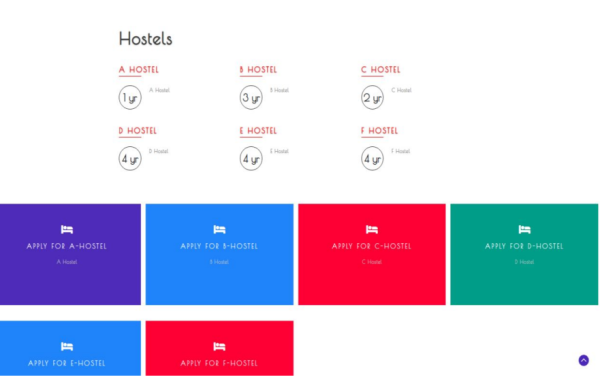
Features of Hostel Room Allocation System
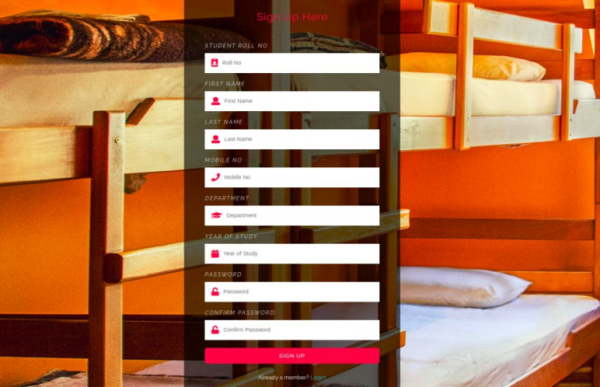
Our system is designed with three roles: Student, Hostel Manager, and Admin. Each role comes with specific features:
1. Student Features
- User Registration & Login
- Request Hostel Room Allocation
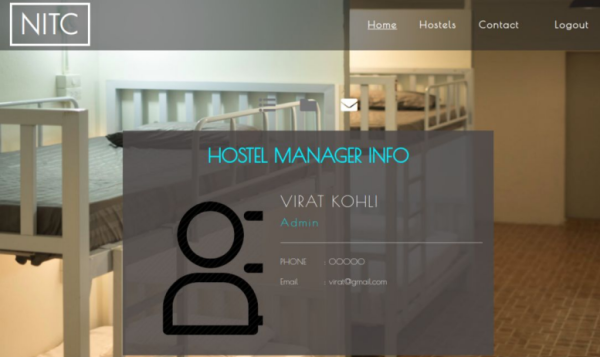
- View Hostel Details and Manager Info
- Update User Profile
- Send Messages to Hostel Manager
2. Hostel Manager Features
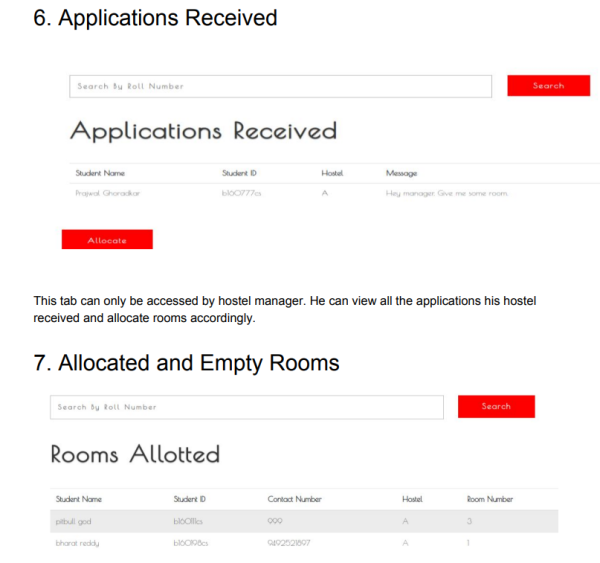
- Review Applications Received
- Allocate and Manage Hostel Rooms
- Track Allocated and Empty Rooms
- Vacate Rooms when needed
- Communicate with Students
3. Admin Features
- Manage Students, Hostels, and Allocations
- Appoint/Remove Hostel Managers
- Monitor Hostel Occupancy Reports
- Full control over system data
Technical Details
- Technology Used: [PHP/MySQL or Java/Python, update based on your stack]
- Frontend: HTML, CSS, JavaScript
- Backend: [Language/Framework]
- Database: MySQL
- Documentation: Included (User Manual PDF)
Installation Guide
- Download the complete project with source code (link below).
- Extract files and move to your XAMPP/Localhost directory.
- Import the SQL database file into phpMyAdmin.
- Open the project in your browser via
http://localhost/projectname. - Login using test credentials or register a new user.
Benefits for Students
- Best Final Year Project Idea for Computer Science & IT students.
- Comes with complete source code + documentation.
- Helps in learning database management, user authentication, and CRUD operations.
- Can be extended with extra features like payment integration, attendance tracking, or biometric login.
Benefits for Institutions
- Digitized hostel allocation = fewer disputes.
- Real-time tracking of allocated and vacant rooms.
- Easy communication between students and management.
- Scalable for multiple hostels and campuses.
“Hostel Management System with Source Code Free Download”
- “Best PHP Projects for Students”
- “Final Year Projects in Computer Science with Documentation”
- “Free College Hostel Management Software”
- “Open Source Hostel Allocation System Download”
Download Hostel Room Allocation System
???? Download Hostel Room Allocation System with Source Code (Free)
Includes:
- Complete Source Code
- SQL Database
- Installation Guide
- Documentation (PDF User Manual)
Conclusion
The Hostel Room Allocation System Project is more than just a student project—it’s a real-world hostel management software. It’s easy to install, user-friendly, and fully customizable.
Whether you’re a CS student, a developer exploring open-source, or an institute looking for hostel software, this project is a valuable resource.
???? Download it now and start exploring the code!