Online Course Registration System in PHP MySQL with Source Code
Download the Online Course Registration System project in PHP and MySQL with source code, SQL database and documentation. This project is suitable for final year engineering students, computer science mini projects, DBMS practical work and web development learning.
The system includes student registration, password reset, pin verification, course enrollment, enrollment history, admin login, department management, session management, course management and student record handling.
Download Online Course Registration System in PHP
The project package includes complete source code, SQL database file, setup instructions and documentation files. Download the project first, then use the Codezips tools below to run, understand, document and prepare it for submission.
Download Online Course Registration System Source CodeComplete This Project with Free Codezips Tools
Downloading the project is only the first step. Use these tools to run the project locally, fix errors, understand the database, prepare documentation and answer viva questions confidently.
Project ZIP Analyzer and Setup Guide Generator
Paste the extracted folder structure and generate a custom setup guide for this project.
SQL File Doctor and Import Fixer
Use this if the course registration SQL file fails to import in phpMyAdmin.
PHP XAMPP Error Doctor and Localhost Fixer
Fix localhost, database connection, Apache, MySQL and PHP errors after setup.
ER Diagram and Database Explainer from SQL
Paste the SQL file and generate ER diagram, table explanation and database viva answers.
Source Code to Viva Simulator
Paste important PHP files such as login, registration or enrollment code and generate viva questions.
Project Report Completeness Checker
Check whether your project report has abstract, objectives, ER diagram, testing, screenshots and future scope.
AI Project Upgrade Lab
Generate AI upgrade ideas such as course recommendation, student risk analysis and smart enrollment suggestions.
README, Resume and Portfolio Generator
Turn this completed project into GitHub README, resume bullet points and portfolio content.
Project Overview
The Online Course Registration System in PHP and MySQL is a web based student enrollment portal that helps students register, log in, manage their profile, browse available courses and enroll in courses online. It also includes an admin panel where administrators can manage students, departments, courses, sessions and enrollment records.
This project is useful for students who want to learn practical PHP and MySQL development because it includes real project concepts such as authentication, CRUD operations, database relationships, form handling, admin dashboard, student profile management and record tracking.
Why Choose This Online Course Registration Project?
Manual course registration can create errors, duplicate student records, missing enrollment data and unnecessary paperwork. This project solves those problems by creating a digital course enrollment system where students and administrators can manage records more efficiently.
Problems in manual course registration
- Enrollment records can be lost or duplicated.
- Students may not know their enrollment history clearly.
- Administrators spend more time updating student and course data manually.
- Department, semester and session records can become difficult to maintain.
- Password recovery and student verification are harder in paper based systems.
How this project helps
- Provides student and admin login panels.
- Allows students to register and update profile details.
- Supports course enrollment and enrollment history.
- Allows admin to manage sessions, semesters, departments and courses.
- Provides password reset and pin verification features.
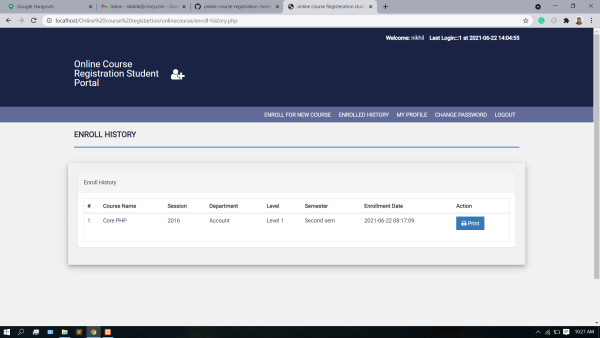
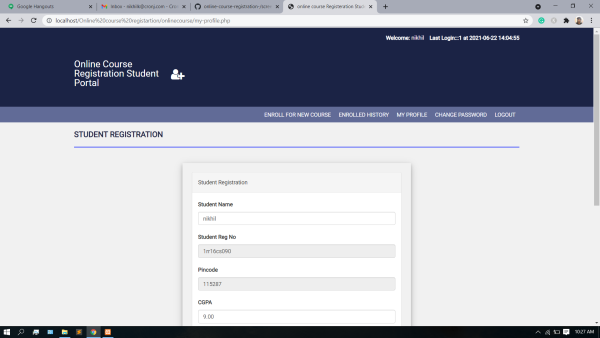
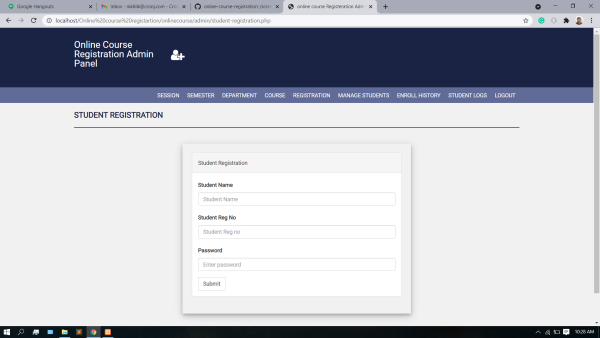
Online Course Registration System Screenshots
Below are screenshots from the student portal and admin panel. Upload these images to your WordPress Media Library and replace the image URL placeholders.
Project Features
This project includes both student side and admin side features. It gives students a course registration portal and gives administrators control over course, department, semester, session and enrollment records.
Student Features
- Student registration with personal details.
- Student login and logout system.
- Password reset or forgot password functionality.
- Student profile management.
- Pin verification for student identity confirmation.
- Browse and enroll in available courses.
- View enrolled course history.
- Print enrollment history if needed.
Admin Features
- Admin login panel.
- Manage student registration records.
- Add and manage academic sessions.
- Add and manage semesters.
- Create and update departments.
- Add, edit and delete course records.
- Monitor course registration and enrollment history.
- View student logs and activity records.
Technical Details
| Part | Technology Used | Purpose |
|---|---|---|
| Frontend | HTML, CSS, Bootstrap, JavaScript | Creates responsive pages, forms, navigation and user interface. |
| Backend | PHP | Handles form submission, login, course enrollment and admin actions. |
| Database | MySQL | Stores students, courses, departments, sessions, enrollments and login records. |
| Local server | XAMPP, WAMP or Laragon | Runs Apache, PHP and MySQL locally for testing. |
| Database tool | phpMyAdmin | Used to create database and import the included SQL file. |
Modules of the Online Course Registration System
User Authentication Module
This module handles student login, admin login, logout and password reset. It helps protect student and admin areas from unauthorized access.
Student Profile Module
This module stores student information such as name, registration number, pin code, CGPA and profile details.
Course Management Module
This module allows courses to be added, updated, categorized and displayed for student enrollment.
Department and Session Module
The admin can manage departments, semesters and academic sessions to organize the course registration process.
Enrollment Module
Students can register for courses and view enrollment history. This module connects students with courses and sessions.
Admin Management Module
Admin users can manage students, courses, departments, sessions, registrations and student activity logs.
How to Run Online Course Registration System in XAMPP
Follow these steps to run the project locally. If any step fails, use the linked Codezips tools to diagnose the problem.
- Download the project ZIP file from the download link.
- Extract the ZIP file on your computer.
- Copy the extracted project folder into the XAMPP htdocs directory.
- Start Apache and MySQL from the XAMPP Control Panel.
- Open your browser and go to localhost/phpmyadmin.
- Create a new database. You can use a name like course_reg_db or the database name mentioned in the SQL file.
- Import the included SQL database file into that database.
- Open the database connection file, usually config.php, db.php or a similar connection file.
- Update database host, username, password and database name.
- Open the project in your browser using the localhost URL.
Localhost URL example
Default XAMPP database settings
Database Setup Guide
The MySQL database is the most important part of this project because student records, course records, session details, department records and enrollment history are stored in database tables.
- Open phpMyAdmin.
- Create a new database for the project.
- Select the created database.
- Click Import.
- Choose the included SQL file from the project folder.
- Click Go and wait for the import to complete.
- Open the config file and make sure the database name matches the database you created.
If the SQL file does not import correctly, paste the error message into the SQL File Doctor and Import Fixer. After importing successfully, paste the SQL file into the ER Diagram and Database Explainer from SQL to generate database documentation and viva answers.
Common Errors and Fixes
| Error | Likely Cause | Fix |
|---|---|---|
| Object not found | Wrong folder path or project not inside htdocs. | Move the project folder to htdocs and open the correct localhost URL. |
| Database connection failed | Wrong database name, username, password or host in config file. | Use localhost, root, empty password and correct database name for default XAMPP. |
| Unknown database | Database was not created or the config file uses the wrong name. | Create the database in phpMyAdmin or update the config file. |
| Table does not exist | SQL file was not imported or imported into the wrong database. | Import the included SQL file into the correct database. |
| Access denied for user root | Wrong MySQL password in config file. | For default XAMPP, root password is usually empty. |
| Blank page | PHP fatal error is hidden or required file is missing. | Enable error reporting temporarily and check the exact error. |
For a personalized fix, paste the exact error into the PHP XAMPP Error Doctor and Localhost Fixer.
Benefits of This Project
For Students
- Good PHP and MySQL final year or mini project.
- Helps understand DBMS concepts and table relationships.
- Includes login, CRUD, session and enrollment logic.
- Can be used for project documentation and viva preparation.
- Can be customized with payment, email, AI recommendation or reporting features.
For Institutions
- Digitizes course enrollment process.
- Reduces manual paperwork and record errors.
- Organizes students, departments, sessions and courses.
- Allows administrators to monitor enrollment history.
- Can be extended into a learning management or academic portal.
Project Documentation Help
For project submission, do not only submit the source code. Prepare a proper report with project overview, objectives, system design, database design, screenshots, testing, future scope and conclusion.
Recommended report sections
- Abstract
- Introduction
- Problem statement
- Objectives
- Scope and limitations
- Software and hardware requirements
- System design
- ER diagram and database design
- Modules description
- Implementation details
- Testing and test cases
- Screenshots
- Future scope
- Conclusion
Use the Project Report Completeness Checker to review your report before submission.
Viva Questions and Answers
AI Upgrade Ideas for Online Course Registration System
To make this project more modern and unique, you can upgrade it with AI or smart features. These ideas are useful for final year submissions, portfolio projects and resume improvement.
AI Course Recommendation
Recommend courses based on student department, previous enrollment, CGPA, semester and learning interest.
Student Risk Analyzer
Analyze student performance, CGPA or enrollment behavior and identify students who may need academic support.
Smart Enrollment Assistant
Suggest whether a course is suitable for a student based on department, level, semester and previous courses.
AI Report Summary
Generate plain language summaries of course enrollment, department activity and student registration trends.
Use the AI Project Upgrade Lab to generate a personalized AI upgrade roadmap for this project.
Suggested Enhancements
- Online payment integration for paid courses.
- Email notifications for enrollment confirmation.
- Student attendance tracking.
- Role based access for faculty, staff and admins.
- Reporting dashboard with charts using Chart.js.
- AI course recommendation system.
- Export enrollment history as PDF.
- Advanced search and filter for courses.
- Student performance analytics dashboard.
Package Includes
- Complete PHP source code.
- MySQL SQL database file.
- Admin and student portal files.
- Setup or README instructions.
- Documentation support for student submission.
Download Online Course Registration System Project
Download the complete Online Course Registration System in PHP and MySQL with source code, database and documentation. After downloading, use the setup, SQL, ER diagram, report and viva tools on Codezips to complete your project submission confidently.
Download Project Source CodeFAQs About Online Course Registration System in PHP
What is the Online Course Registration System in PHP?
It is a web based PHP and MySQL project that allows students to register, log in, enroll in courses and view enrollment history while admins manage students, courses, departments and sessions.
Is this project suitable for final year students?
Yes. It is suitable for final year projects, mini projects, DBMS practical work and PHP MySQL learning.
Which database is used in this project?
The project uses MySQL database and can be managed through phpMyAdmin in XAMPP, WAMP or Laragon.
How do I run this project in XAMPP?
Extract the project folder into htdocs, start Apache and MySQL, create a database in phpMyAdmin, import the SQL file, update the config file and open the project through localhost.
What should I do if the SQL file does not import?
Copy the phpMyAdmin error and paste it into the Codezips SQL File Doctor and Import Fixer to identify the problem and possible solution.
Can I add AI features to this project?
Yes. You can add AI course recommendation, student risk analysis, smart enrollment assistant or AI report summary. Use the AI Project Upgrade Lab to generate a roadmap.
Can I use this project on my resume?
Yes, after understanding and customizing it. Use the README, Resume and Portfolio Generator to create resume bullet points and GitHub project content.
Conclusion
The Online Course Registration System in PHP and MySQL is a practical student project for learning web development, DBMS, authentication, CRUD operations and admin panel management. It includes student registration, profile management, pin verification, course enrollment, enrollment history, admin login, course management, department management and session management.
For a stronger submission, do not stop at downloading the source code. Run the project locally, import the database properly, generate an ER diagram, understand important PHP files, prepare viva questions, complete the project report and consider adding an AI upgrade. This is how you turn a normal source code download into a complete final year project submission.